System Colors
System Colors brings macOS appearance, Night Shift and True Tone into one menu. Use it when you want to change the system’s appearance or adaptive color behavior. These choices apply at the system level, rather than only to the device section you last opened.
Where to find it: App Menu > Tools > System Colors. Dark Mode, Night Shift and True Tone are also available in the menu-bar icon’s right-click menu.
Night Shift and True Tone need system support. Their right-click quick-menu actions are disabled when unavailable.
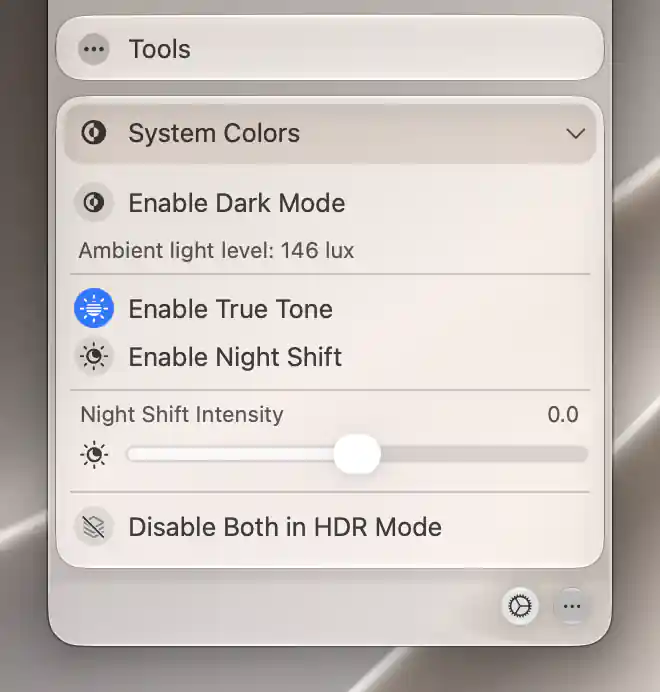
System Colors brings system appearance, ambient-light information and color adaptation into one menu.
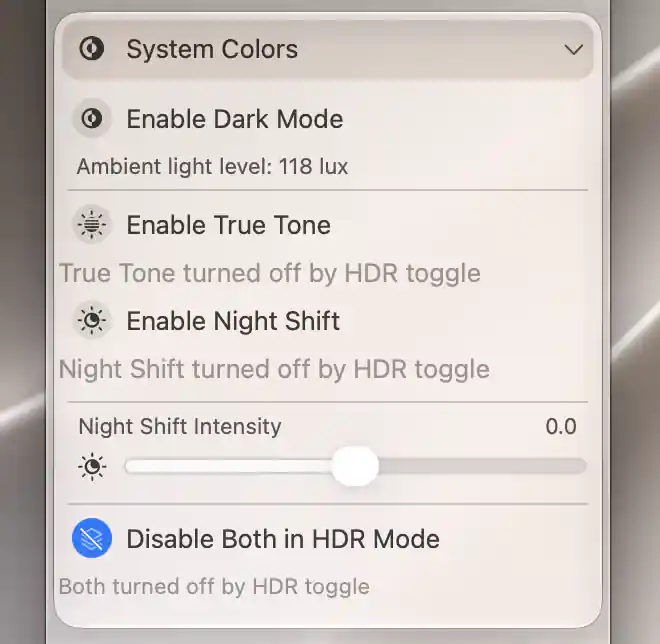
Enabling HDR on the LG TV turned off True Tone and Night Shift.
Appearance and adaptation
Choose the effect that matches your purpose:
- Enable Dark Mode changes macOS’s appearance.
- Enable True Tone requests automatic white-balance adaptation.
- Enable Night Shift requests the system’s warmer-color feature.
After an action, the switches refresh from system state. A visible switch is not a guarantee that the Mac supports the feature.
Adjust Night Shift strength
When the global Night Shift control is available, use its slider to change the strength. The −10 to +10 scale has a central snap point and expresses a relative adjustment, not a temperature in kelvin.
HDR interaction
Enable Disable Both in HDR Mode when you want BetterDisplay’s HDR handling to turn off Night Shift and True Tone. This is a saved preference shared with Advanced Display Settings.
Status lines explain when that policy has acted: True Tone turned off by HDR toggle, Night Shift turned off by HDR toggle, or Both turned off by HDR toggle. Read them as explanations of the current state, rather than additional buttons.
Changing a system color toggle is an immediate system request; changing the HDR preference sets how subsequent HDR handling behaves. See HDR.
Ambient light
Ambient light level appears when usable sensor readings are available. Its unit, lux, describes light arriving at a surface; nits instead describe light emitted by a display. If several display-associated sensors provide readings, this menu shows their average.
Opening the submenu starts observation and closing it stops observation. An absent reading means the app has no usable sensor value, rather than that the room is dark.
See Custom Keyboard Shortcuts for related keyboard actions.
Additional information
This section explains which features require Pro and how availability differs between Mac platforms.
Features requiring Pro license
- The Night Shift strength slider.
- Disable Both in HDR Mode.
The system-color toggles and ambient-light reading have no separate Pro requirement. Custom keyboard shortcuts for these actions have their own requirements.
Platform compatibility
All features described on this page are available on both Apple silicon and Intel Macs when the relevant system features and sensors are supported. The platform alone does not guarantee Night Shift, True Tone or an ambient reading.