Refresh Rate
Use Refresh Rate to change how often the display updates while keeping the desktop at its current resolution. The menu helps you compare the rates available for that setup, and an optional reporter lets you inspect the timing macOS reports while the menu is open.
Where to find it: App Menu > display > Refresh Rate, usually under the more-options chevron.
The display must be connected and offer multiple alternative rates at the current resolution and bit depth. For a mirror target, the mirror-target resolution option must also be enabled. The rates you see, including any variable-rate choices, depend on the display, its connection and the current mode.
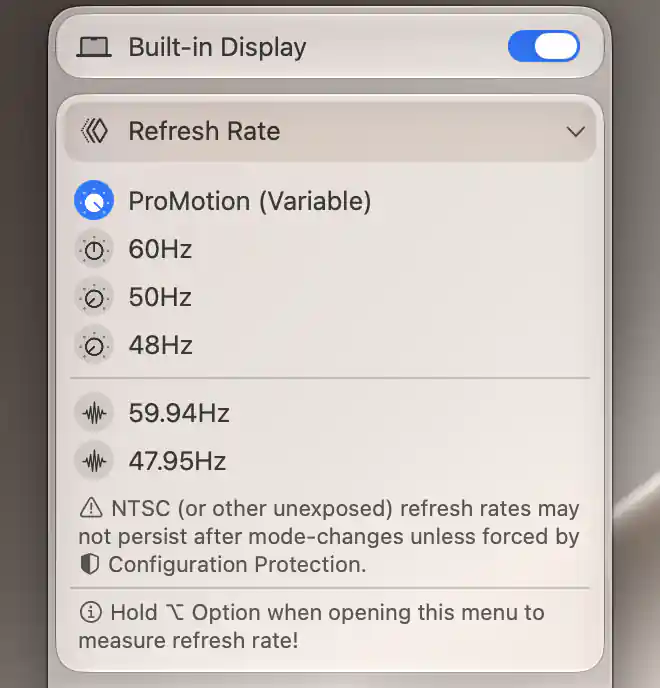
Refresh Rate lists the choices supported by the current resolution, including ProMotion on this panel.
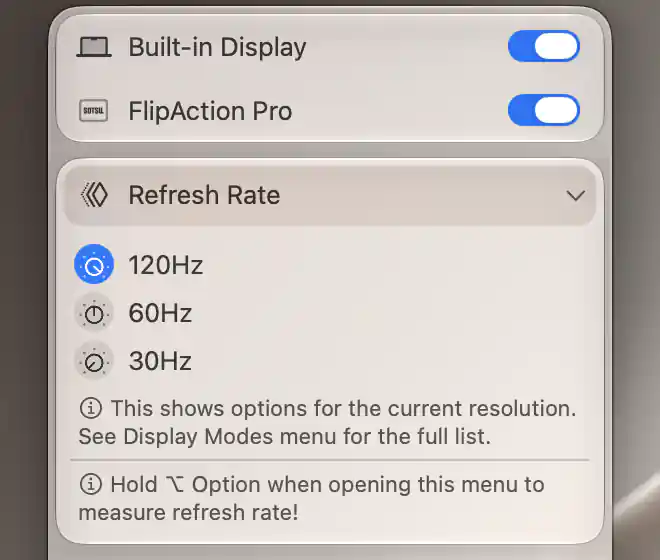
This list is limited to the current resolution; Display Mode provides the complete set of modes.
Choose a rate
The menu lists refresh rates that work with the current resolution, HiDPI class and bit depth. A row marked (Variable) represents a variable-rate choice. Select the rate you want; it applies immediately, and the active selection is marked. There is no separate Apply button.
For the rendering background, see how macOS scaling, HiDPI and LoDPI work.
For example, a display might offer a higher rate at one desktop resolution than at another. If other rates exist outside the current setup, the menu points you to Display Mode so you can inspect the complete combinations. A high rate listed there is not necessarily available with your current resolution or connection format.
If a low-level rate change fails, BetterDisplay refreshes the selection from the available state. Read the refreshed selection rather than treating the click alone as confirmation that the change succeeded.
Additional connection-level rates
Some displays expose extra rates through the connection, beyond those offered as ordinary display modes. When available, these appear in a separate group with waveform icons. They can include NTSC-derived fractional rates and other rates that the ordinary mode list does not expose.
The warning beneath that group explains an important difference: an additional rate may not persist after a later mode change unless Configuration Protection enforces it. Changing a rate updates any enabled refresh-rate protection, but does not turn protection on for you.
Use Color Mode when investigating a rate/connection-format tradeoff on Apple silicon. A different connection format can come with a different set of available rates.
Opening modifiers
The usual way to use this menu is to open it and select a listed rate. The opening shortcuts below are useful when you want to inspect the available choices more closely.
Refresh-rate reporter
The reporter helps you compare observed timing with the rate information supplied by macOS. Open the submenu while holding Option to show it. It updates about once a second and stops when the submenu disappears.
The three readings answer different questions:
| Label | Meaning |
|---|---|
| Measured refresh rate: | Average timing of macOS display-link callbacks over roughly two seconds. |
| Reported actual refresh rate: | Rate derived from the display link’s reported frame duration. |
| Reported nominal refresh rate: | Rate derived from the screen’s reported timing/capability information, with fallbacks when necessary. |
These readings need not agree exactly. Variable refresh and the system’s scheduling can affect them, and a zero before data arrives does not mean that the display has stopped refreshing.
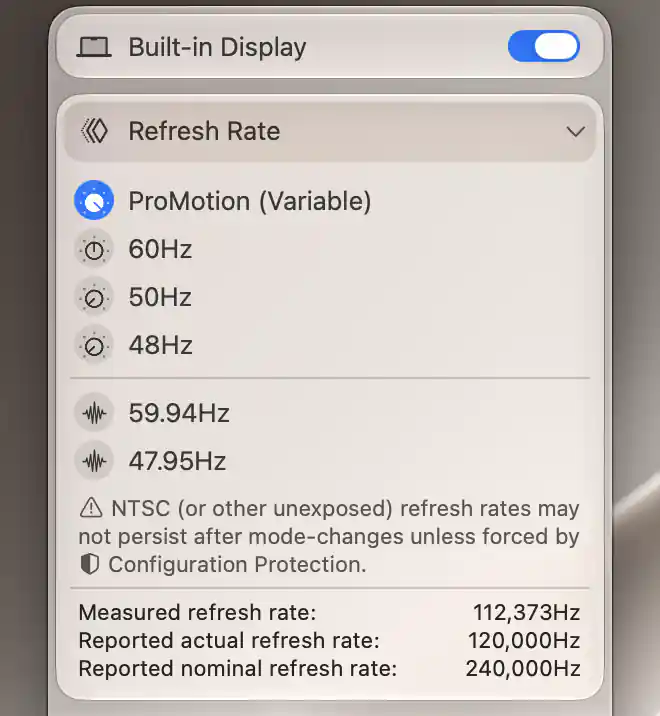
Option-opening reveals live measurements alongside the rates reported by macOS.
Additional information
This section explains which features require Pro and how availability differs between Mac platforms.
Features requiring Pro license
- Group UI scale matching when an ordinary rate selection changes the display mode.
- Configuration Protection that keeps a selected refresh rate in place.
Rate selection, the opening modifiers and the refresh-rate reporter do not themselves require Pro.
Platform compatibility
Ordinary rate selection and the refresh-rate reporter are available on both Apple silicon and Intel Macs. The additional connection-level rate information and direct connection-rate choices require Apple silicon; the ordinary mode list is used when that information is unavailable.
The display must still offer the relevant rates at the current resolution, rendering scale and bit depth. Processor type alone does not establish a particular rate or variable-refresh capability.